vhliboptimal
vhliboptimal





-green.svg)
| Header | Description |
|---|---|
| Project | VHLibOptimal |
| Description | C++17 library for fast shape detection, object counting, and outer boundary estimation. |
| Current Version | 0.8.1 (2026) |
| Development started | 2006 |
| Major C++17 rewrite | started in early 2026 |
| Author | V01G04A81 / Viktor Glebov |
| License | MIT |
| Source code | https://github.com/vigatron/vhliboptimal |
C++17 library for fast shape detection, object counting, and outer boundary estimation.
A lightweight, zero-dependency C++17 library focused exclusively on identifying discrete shapes, counting objects, and extracting their spatial coordinates and external dimensions using efficient bit-packed grid scanning. The core algorithm, originally developed in 2006, received a complete modern C++17 rewrite in 2026. This version introduces a clean object-oriented interface optimized for modern Single Board Computer applications while preserving design decisions refined through two decades of embedded development.
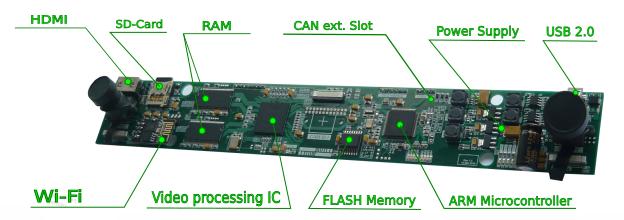
Historical reference: The 2016 FPGA-based stereo vision system that demonstrated the algorithm’s real-time operation in a dual-camera pipeline.
Project Overview
vhliboptimal is a high-performance C++ library for fast shape detection, object counting and outer boundary estimation.
Originally developed in plain C (starting in 2006) for commercial embedded projects on ARM and AVR platforms. Later evolved into an FPGA-accelerated implementation (2016). It has been completely modernized in 2026 with a clean object-oriented C++17 interface while preserving its efficiency-focused philosophy.
It uses an optimized grid-based approach: the image is divided into a configurable Cells Matrix, and connectivity is tracked using compact BitFields. This design delivers excellent performance with very low memory and CPU usage, making it ideal for embedded systems and real-time applications. Unlike full computer vision frameworks such as OpenCV, vhliboptimal focuses exclusively on shape extraction and therefore remains lightweight and easy to integrate. It excels at processing binary or high-contrast images and gracefully handles small gaps and noise thanks to tunable parameters.
🛠 Technical Specifications
- Language: C++17
- Target Platforms:
- Desktop/OS: Linux (Primary) / Windows & macOS (Cross-platform with minimal adjustments)
- Modern SBCs:
- Raspberry Pi (3/4/5)
- Orange Pi (Zero/3/5)
- Jetson Nano
- Rock Pi
- … and similar ARM Cortex-A/M based boards.
- Modern CPU/MCUs: ARM Cortex-M and Cortex-A platforms (including STM32MP1 MPUs) with C++ compiler support.
- STM32F4 / STM32F7 / STM32H7 (zero-allocation with FIXED_GRID)
- ESP32 (zero-allocation with FIXED_GRID)
- Build System: CMake 3.16+
- License: MIT
Key Features
- Zero third-party dependencies (OpenCV, etc.)
- Zero-allocation (FIXED_GRID) mode — ready for FreeRTOS / bare-metal
- Optional dynamic allocation for desktop/SBC convenience
- Highly optimized grid-based scanning with bit-packing
- Three raw C-style callbacks for maximum interoperability (C, Python, Rust FFI-friendly) and predictable execution behavior
- Configurable cell size and noise tolerance
- Real-time contour and content processing via callbacks
- History & Evolution
- Quick Start & Integration Example
- Library Configuration
- A Fun Geek Note: 2016 FPGA vs 2026 C++ (The Branching Dilemma)
- ChangeLog
Road Signs Contour Extraction Example
The examples below demonstrate how vhliboptimal is utilized within a real-world road sign recognition application.
In this specific pipeline, the library is responsible exclusively for the high-speed, deterministic extraction of shape contours and internal spans from pre-processed frames. The extracted geometric data is then passed to a higher-level classification module.
Example #1: Road signs (front view)

|

|

|

|

|

|
Example #2: Road signs (view from angle)

|

|

|

|

|

|
Example #3: Geometric Shapes

|

|
Example #4: Text Localization (character coordinates & sizes)

|

|
Note: Original image processed at 1080p (contains > 2000 character objects). Only positions and sizes are extracted — content is not recognized.
Architecture & Key Components
The library operates completely abstracted from raw graphic decoders or UI frameworks (like OpenCV or stb_image). It processes data streams through an abstract coordinate grid:
CellsMatrix: Manages the spatial geometry of the grid. Images are analyzed in configurable blocks (cellsize), decreasing overall data dimensionality.BitField: A packed bit array tracking filled/empty cells. The algorithm utilizes a dual-bitmask architecture: a global mask for the entire frame (from which figures are extracted) and a local mask dedicated to tracking the traversal state of the specific figure currently being processed. This eliminates the need for heavy graph data structures and keeps memory access highly predictable.VHOptimalFigure: Encapsulates a single extracted shape, containing its bounding box, sorted sequential contours, and analytical span strings.
Limitations & Trade-offs
- Image Type: Best suited for binary or high-contrast images (a direct inheritance from its B&W display origins).
- Threading: Currently single-threaded (multi-threading support is planned for future releases).
- Resolution vs. Performance: To achieve real-time FPS on SBCs, the algorithm relies on grid-based downsampling (
cellsizetypically 8-16px for real-time SBC profiles). Fine image details smaller than the configured cell size will be intentionally lost to preserve CPU cycles. - Memory Profile: Supports both dynamic allocation (convenient for SBCs/PCs) and strict zero-allocation / FIXED_GRID mode (for bare-metal RTOS, STM32, ESP32) starting from v0.8.0.
⚠️ Best Practices for Optimal Results
The algorithm was originally developed and validated for live, uncompressed video streams captured directly from a camera. For optimal contour accuracy, feed vhliboptimal with the native, uncompressed camera frames whenever possible. Modern camera pipelines often introduce JPEG/MJPEG compression, scaling, denoising, sharpening, or other ISP processing before the frame reaches the application. These operations can introduce blocking artifacts, ringing, blur, and loss of fine edge information, which may reduce contour accuracy.
Recommendation: For the best results, use a direct, uncompressed camera stream and perform only the minimum required preprocessing before passing the frame to
vhliboptimal. If an uncompressed stream is not available, lightweight preprocessing such as hardware-accelerated thresholding or edge enhancement may help compensate for compression and image-processing artifacts.
Library tests and benchmark project
Tested Platforms
| Platform / Board | CPU / MCU | Arch | Freq |
|---|---|---|---|
| ASUS Vivobook | Intel i5-1135G7 | x86_64 | 2.40 GHz |
| AMD Based Desktop | AMD FX-8300 | x86_64 | 3.30 GHz |
| Orange Pi PC Plus | ARM Cortex-A7 | ARMv7-A | 1.20 GHz |
| Raspberry Pi Model B+ (Rev. 1.2) | ARM1176JZF-S | ARMv6 | 700 MHz |
| CMB32F407HDMIR3 | STM32F407 | Cortex-M4 | 168 MHz |
| WAVESHARE CORE7XXI | STM32F746 | Cortex-M7 | 216 MHz |
| CMB32H750HDMIR1 | STM32H750 | Cortex-M7 | 480 MHz |
| ESP32-WROOM-32D | ESP32-D0WD | Xtensa LX6 | 240 MHz |
Benchmark project and test results
vhliboptimal_test benchmarks page
© 2006 – 2026 V01G04A81 / Viktor Glebov