ditherpic
VHPIC Images Converter




VHPIC Images Converter is a specialized desktop utility designed for transforming modern image files into retro-compatible graphics assets.
Unlike generic image editors, this tool focuses on low-color, low-resolution rendering pipelines that were historically used in vintage computing, embedded systems, and early video hardware.
By combining classic dithering algorithms, color depth reduction, and retro video mode emulation, the converter allows developers, hobbyists, and digital archivists to:
- Recreate the look and feel of classic platforms such as DOS, EGA, and ZX Spectrum.
- Prepare assets for constrained environments (FPGA projects, microcontrollers, or custom video mixers).
- Explore how different dithering strategies affect image quality under strict hardware limitations.
- Generate authentic retro visuals for demos, games, or technical case studies.
This makes the tool invaluable for:
- Retro-coding enthusiasts who want to integrate period-accurate graphics into their projects.
- Hardware developers needing test images for low-spec pipelines.
- Educators and archivists demonstrating the evolution of computer graphics.
- Artists and designers experimenting with nostalgic aesthetics.
Features
Dithering Algorithms: Full support for classic error-diffusion filters:
- Floyd-Steinberg — fast, widely used, smooth gradients but may show “worm-like” artifacts.
- Jarvis-Judice-Ninke — distributes error across 12 neighbors, very smooth but computationally heavy.
- Stucki — similar to Jarvis but optimized weights, often considered the highest quality diffusion.
- Burkes — simplified Jarvis variant, faster with good balance of quality and speed.
- Atkinson — classic Macintosh filter, preserves contrast, iconic retro look, less detail in gradients.
- Sierra 3-row — high-quality, smooth gradients, slower due to wider error spread.
- Sierra 2-row — faster compromise, good for real-time rendering.
- Sierra Lite — minimal diffusion, very fast, suited for embedded systems but lower quality.
Flexible Color Depth & Modes:
- 8-bit Indexed Color (256 colors)
- 6-bit Indexed Color (64 colors)
- 4-bit EGA 16-color palette
- 4-bit ZX Spectrum palette (fixed 15+1 colors)
- 4-bit Grayscale (16 levels / 4b Gray)
- 2-bit Grayscale (4 levels / 2b Gray)
- 1-bit Black & White (Monochrome / 1b B&W)
Target Retro Video Modes: Automatic aspect-ratio aware resizing or cropping for various display standards:
- Modern/High-Res:
WUXGA(1920x1200),UXGA(1600x1200),FHD(1920x1080) - Classic PC:
SXGA(1280x1024),XGA(1024x768),SVGA(800x600),VGA(640x480) - Handheld & Widescreen:
WVGA(800x480),WQVGA(400x240),QVGA(320x240) - Retro Systems:
DOS(320x200, 8:5),ZX(256x192, 4:3) Originalmode to preserve source dimension ratio.
Interface Overview
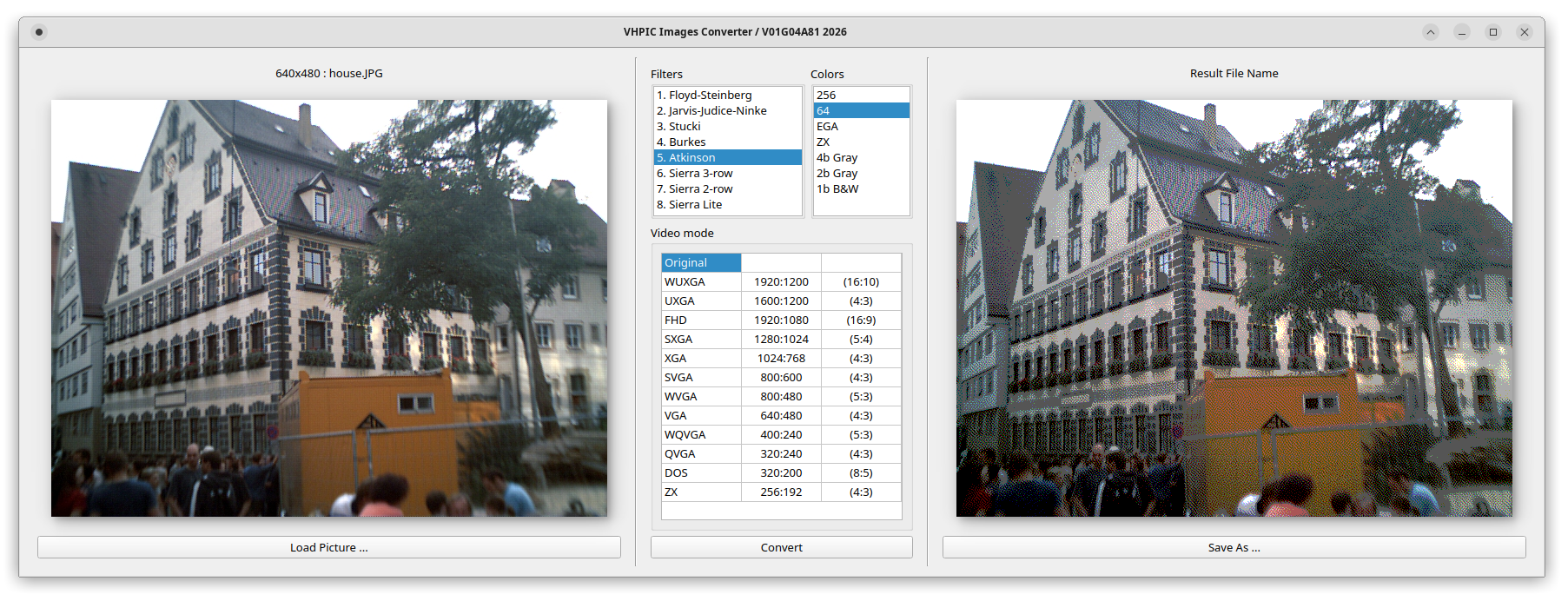
The interface is structured cleanly into three main layout sections:
- Source Panel (Left): Load your input graphics (
.jpg,.png, etc.) and view image specifications. - Configuration Panel (Center): Choose your preferred dithering filter, color count, and target display resolution/video mode.
- Result Panel (Right): Preview the dithered low-color output before exporting the final image asset.
Usage
- Click Load Picture… to open an image file.
- Select your desired dithering filter from the Filters list.
- Select the target bit-depth from the Colors panel.
- Pick the destination resolution standard from the Video mode table.
- Click Convert to generate the low-spec retro preview.
- Click Save As… to export your compiled asset into the destination container format.
System Requirements
- Compatible with modern Windows/Linux environments running native window managers or desktop suites.
- Built-in optimizations for high-concurrency pixel mapping and color quantization pipelines.
Related Tools
- formats/cells — Cell specification guidelines.
- pushk2cellseditor — High-performance grid and tile pipeline data tools.
- viewvhpic — Native image viewer for compiled
.vhpicgraphics assets.
© 2025–2026 Viktor Glebov (V01G04A81) — MIT License